如何设置RevoUninstaller启用显示系统组件功能
1、点击“RevoUninstaller”

2、在“RevoUninstaller”窗口中,点击“选项”
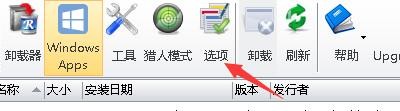
3、在“选项”窗口中,点击“卸载器”

4、在“卸载器”窗口中,勾选“显示系统组件”

5、点击“确定”即可

阅读量:97
阅读量:24
阅读量:174
阅读量:92
阅读量:171
1、点击“RevoUninstaller”
2、在“RevoUninstaller”窗口中,点击“选项”
3、在“选项”窗口中,点击“卸载器”
4、在“卸载器”窗口中,勾选“显示系统组件”
5、点击“确定”即可